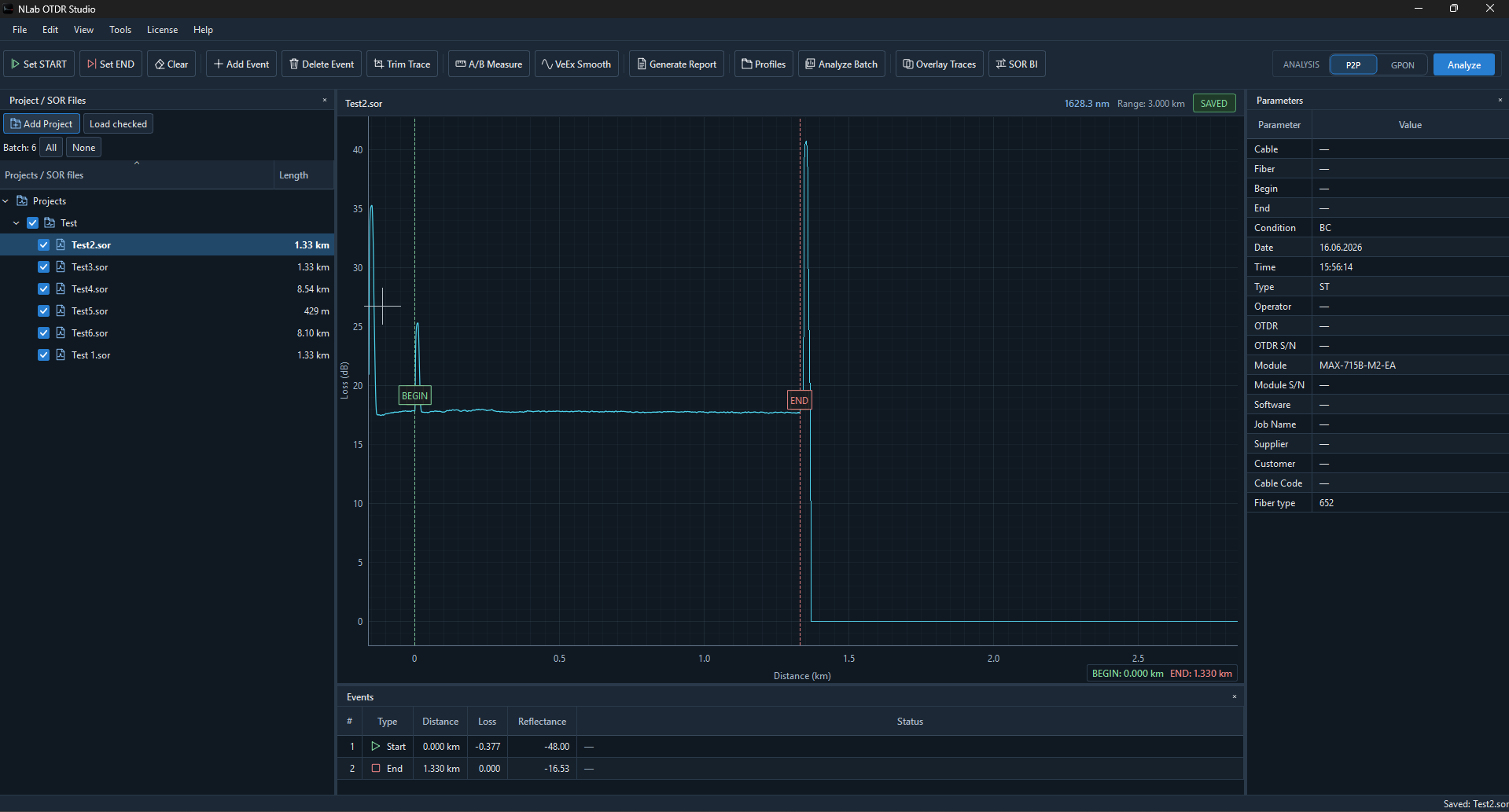
THE PRODUCTION WORKSPACE · Projects, trace, events and parameters together. Click to enlarge ↗
ONE DESKTOP. MANY INSTRUMENTS.
From field work to a clearer picture.
NLab OTDR Studio is desktop software created for fiber optic technicians, installers and engineers who work with OTDR measurements and SOR files.
The application provides a modern environment for opening, analyzing and working with OTDR traces without being tied to a single OTDR manufacturer.
It is designed around real fiber optic workflows: checking measurements after field work, inspecting events, comparing traces, analyzing P2P and GPON links and preparing measurement documentation.
Instead of treating an SOR file as a static report, NLab OTDR Studio gives you direct access to the trace and the measurement data stored inside it.
A COMPLETE ANALYSIS ENVIRONMENT · Read the signal and its events in one view. Click to enlarge ↗
01 / PROJECTS & SOR FILES
Your project. Already organized.
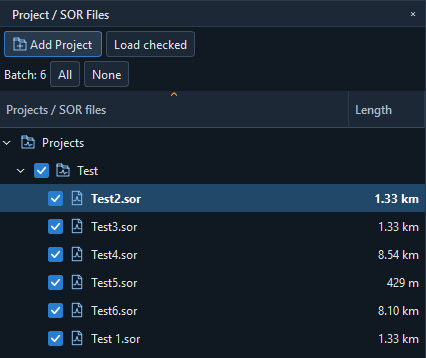
Choose an existing project root folder and keep the physical folder structure you already use. Browse its SOR files recursively, then move between measurements without losing the project context.
Keep the folder hierarchy. Work with the actual folders on disk.
Review a whole measurement set. Select files together and load multiple traces.
Find your next fiber quickly. See measurement lengths alongside the SOR filenames.
PROJECTS / SOR FILES · Batch selection and measurement lengths. Click to enlarge ↗
Explore this workspace 18 topics +
01 /
Multi-Vendor OTDR SOR Viewer
Fiber technicians frequently work with measurements created using different OTDR platforms.
NLab OTDR Studio is developed with multi-vendor SOR compatibility in mind and is tested with measurement files from OTDR manufacturers including:
ViaviEXFOVeEXYokogawa
This makes it possible to use one desktop application for reviewing measurements originating from different OTDR systems.
Because individual manufacturers and firmware versions can implement SOR data differently, compatibility is continuously tested using real measurement files.
The OTDR trace is the center of the analysis workflow.
NLab OTDR Studio provides an interactive trace view that allows technicians to examine the optical signal across the entire measured fiber.
You can zoom into individual sections of the trace and inspect areas around splices, connectors, splitters and reflective events.
This is particularly useful when automatic event detection does not tell the complete story.
02 / OTDR TRACE ANALYSIS
The signal. The markers. The measurement.
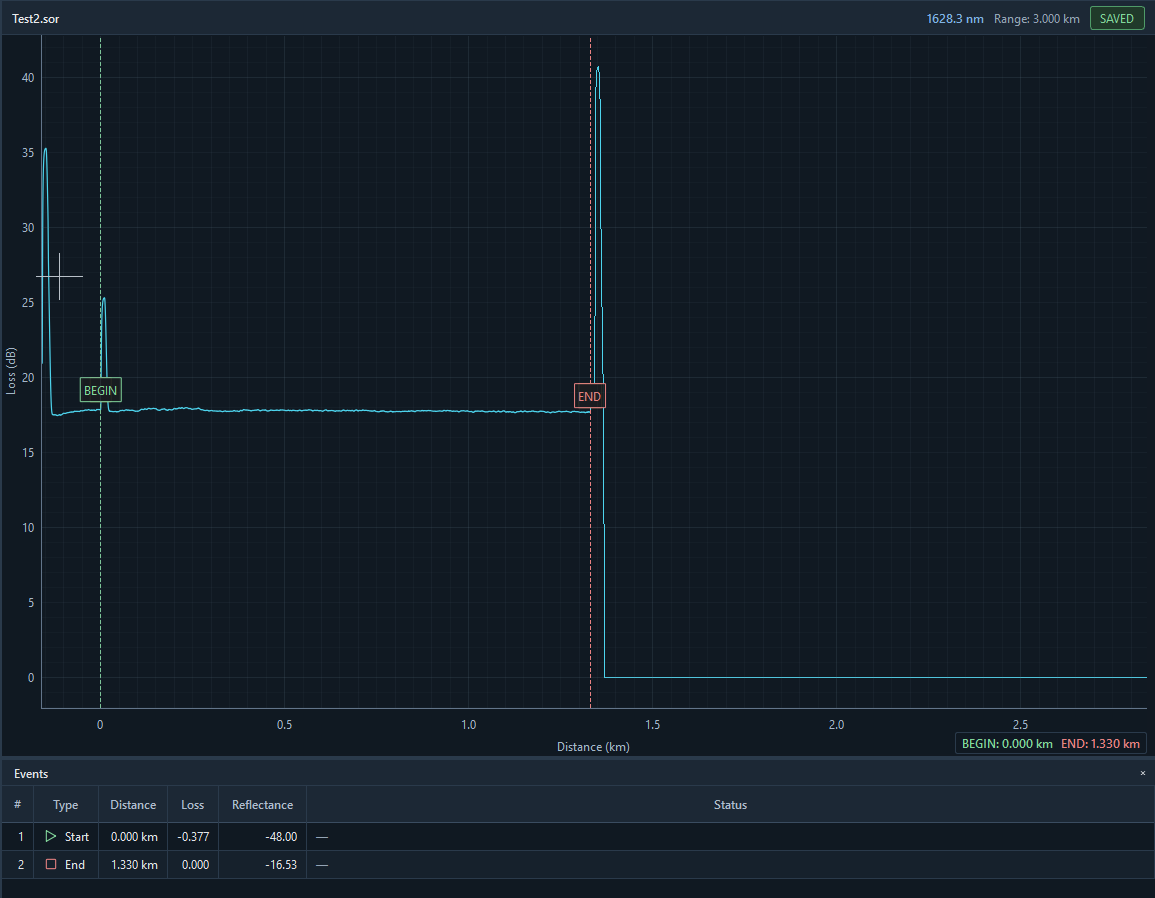
Keep the reflectogram, measured distance and Events table in the same workspace. Green BEGIN and red END markers define the link you are inspecting, with loss and reflectance directly below the trace.
TRACE + EVENTS · BEGIN 0.000 km · END 1.330 km · Distance, loss and reflectance. Click to enlarge ↗
03 /
OTDR Event Analysis
Event tables provide a quick overview of what the OTDR detected along the fiber.
NLab OTDR Studio allows you to review events together with the corresponding trace.
Depending on the data contained in the SOR file, event information can include:
event position
event loss
reflectance
cumulative loss
event type
start and end events
Seeing the event table and trace together makes it easier to understand what is happening at a particular location in the network.
04 /
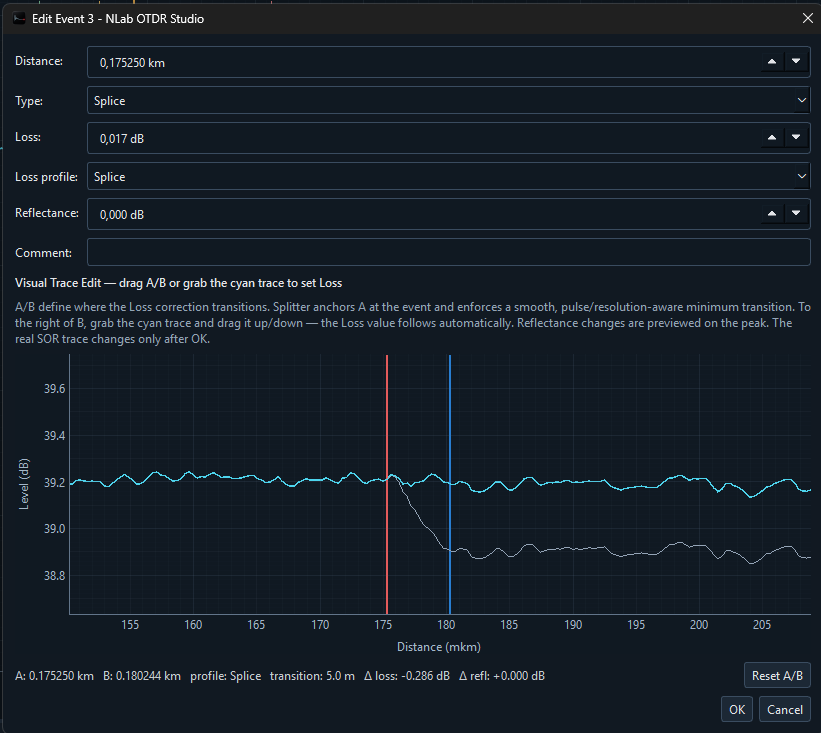
Edit OTDR Events
Automatic event detection is useful, but it is not always perfect.
NLab OTDR Studio includes tools that allow users to work directly with detected events.
Events can be reviewed and adjusted when required, providing more control over the final trace interpretation.
This can be useful when correcting automatically detected locations or preparing a trace for further analysis.
Original measurement files should always be preserved separately whenever edited data is used for documentation.
03 / EVENTS & VISUAL TRACE EDITING
Inspect the change before you apply it.
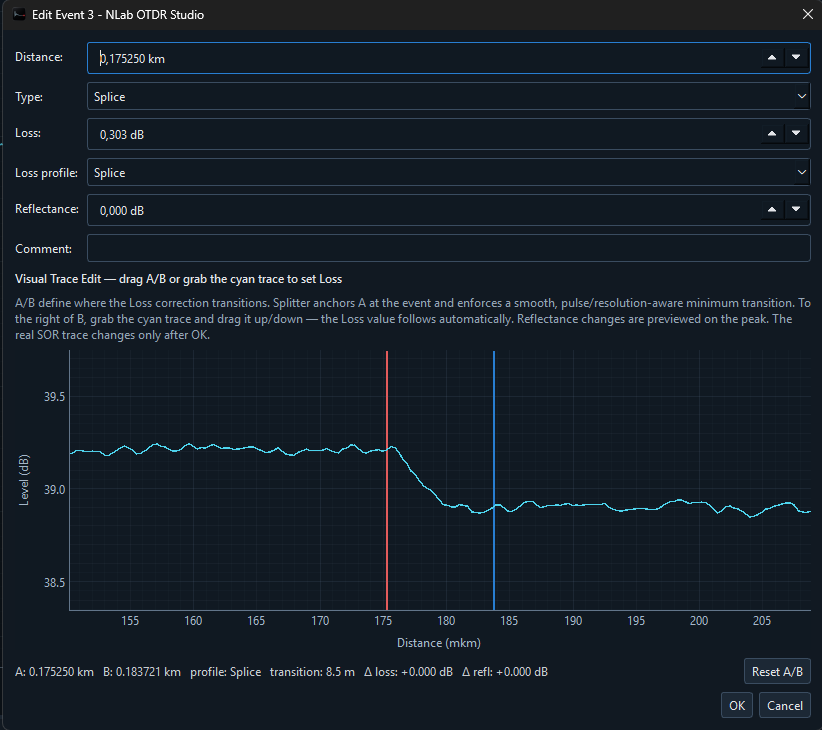
Use the event editor to inspect distance, type, loss and reflectance. A/B markers define the transition; the visual preview shows the adjusted trace before you confirm the edit.
BEFORE · A splice event and its original loss profile. Click to enlarge ↗EDIT PREVIEW · Compare the cyan adjustment with the original trace. Click to enlarge ↗
05 /
BEGIN and END Trace Control
Real OTDR measurements often contain launch fibers, receive fibers or sections of trace that are not part of the network being documented.
NLab OTDR Studio provides tools for defining the relevant beginning and end of the analyzed fiber.
This makes it easier to focus analysis on the actual link instead of the entire acquisition range.
06 /
OTDR Markers
Manual markers are an essential part of detailed OTDR analysis.
NLab OTDR Studio provides A and B markers that can be positioned directly on the trace.
Markers allow specific sections of the measurement to be inspected and compared without relying only on automatically generated events.
They are especially useful for manual verification and detailed trace inspection.
A CONNECTED WORKFLOW
Follow the fiber. Keep the context.
Move from the original measurement to a reviewed trace and a report you can share.
01OpenOriginal SOR
02AnalyzeTrace + events
03ReportPDF documentation
07 /
P2P Fiber Analysis
Point-to-point fiber links are one of the most common OTDR measurement scenarios.
NLab OTDR Studio provides a workflow for reviewing P2P measurements, including trace inspection, event analysis and link start/end definition.
The application can be used for measurements from access networks, backbone connections, campus networks, FTTx infrastructure and other optical links.
08 /
GPON OTDR Analysis
Passive Optical Networks create a more complex OTDR trace because the optical path may contain one or more splitters.
NLab OTDR Studio includes tools intended for GPON analysis and visualization.
This can help technicians interpret measurements containing splitter events and understand the optical structure of a passive network.
04 / COMPARE & ANALYZE
More measurements. A connected workflow.
Move from selected SOR files into Analyze Batch, Overlay Traces or SOR BI. Switch between P2P and GPON analysis from the main workspace.
Review individual fibers, compare related measurements and keep the analysis in the same project.
THE PRODUCTION TOOLBAR · Report, batch, overlay and bidirectional entry points. Click to enlarge ↗ANALYSIS MODE · P2P and GPON controls. Click to enlarge ↗
09 /
Compare OTDR Traces
Comparing traces can reveal differences that are difficult to notice when measurements are viewed separately.
NLab OTDR Studio supports trace comparison and overlay workflows, allowing multiple measurements to be inspected together.
This can be useful when comparing:
different wavelengths
measurements before and after repair
fibers from the same cable
measurements taken at different times
traces from opposite directions
reference measurements and current measurements
Trace comparison can make changes in loss, reflection or fiber behavior much easier to identify.
10 /
Bidirectional OTDR Workflows
For higher-quality fiber characterization, measurements can be performed from both ends of the optical link.
Bidirectional analysis can reduce the influence of backscatter differences that can affect the apparent splice loss measured from only one direction.
NLab OTDR Studio includes tools intended to support workflows involving measurements from both directions.
11 /
OTDR Trace Trimming
Long traces can contain launch sections, receive sections or measurement areas that are not needed for the final analysis.
Trace trimming tools provide more control over the section of measurement being processed.
This can simplify analysis and help create a cleaner representation of the relevant fiber link.
12 /
OTDR Measurement Generator
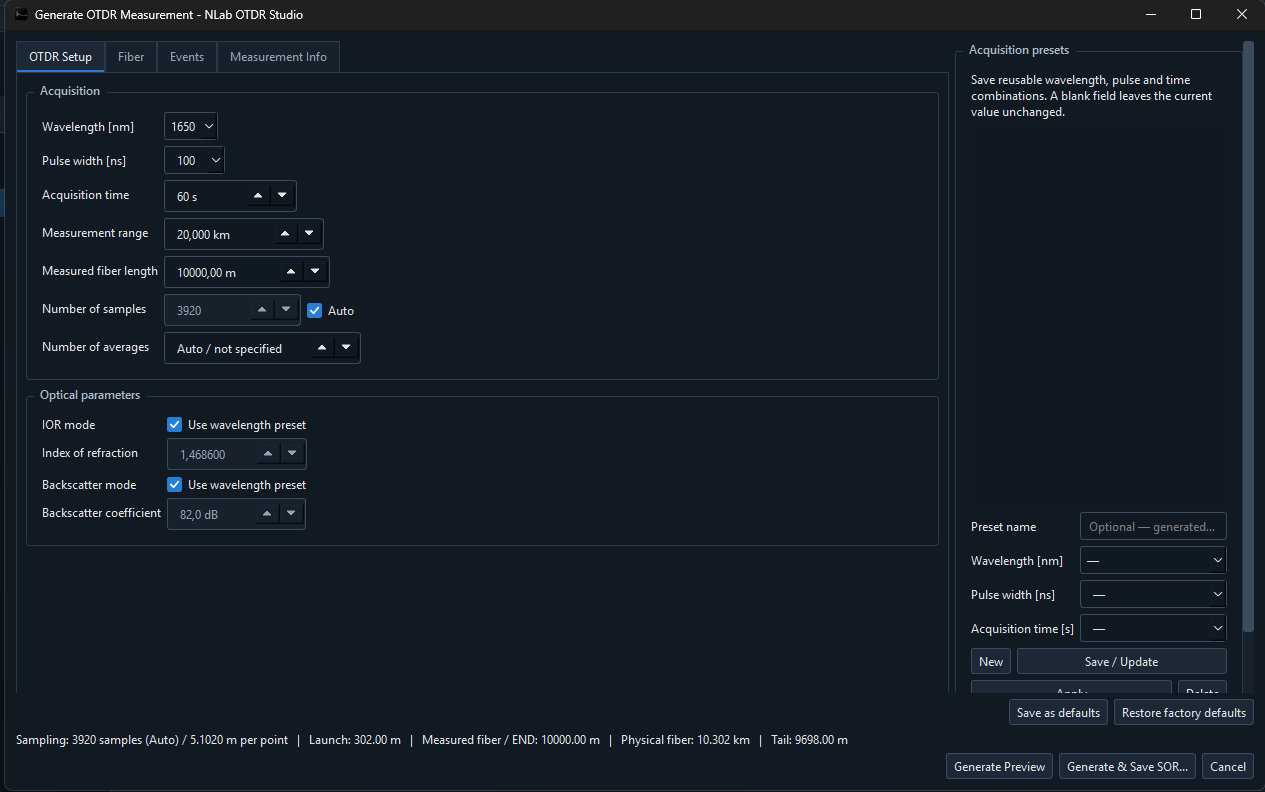
NLab OTDR Studio also includes an OTDR trace generator for creating simulated fiber measurements.
Generated measurements can include configurable parameters such as:
fiber length
attenuation per kilometer
wavelength
pulse width
acquisition settings
launch fiber
events
reflections
optical splitters
Splitter configurations can include common ratios such as:
1×21×41×81×161×321×64
The generator can be useful for training, software testing, demonstrations and learning how different optical events affect an OTDR trace.
05 / GENERATOR & DOCUMENTATION
Configure a measurement. Understand its behavior.
The OTDR Generator brings acquisition settings, fiber configuration, events and measurement information into a focused tabbed workspace. Preview a simulated trace or generate and save an SOR file for training and testing.
For measured SOR data, Generate Report remains available from the main toolbar to prepare project documentation.
OTDR GENERATOR · Acquisition settings, optical parameters and reusable presets. Click to enlarge ↗
13 /
Create OTDR PDF Reports
SOR files are ideal for storing measurement data, but customers and project documentation often require a readable report.
NLab OTDR Studio can create PDF reports based on OTDR measurements.
Reports can include important measurement parameters, event information and trace data in a format suitable for documentation and sharing.
This allows the original SOR measurement to remain available for detailed analysis while the PDF can be used as the human-readable project record.
Fiber projects can quickly generate dozens or hundreds of SOR measurements.
NLab OTDR Studio is designed to make working with collections of OTDR files more convenient than reviewing every measurement directly on a field instrument.
This makes the software suitable not only for individual troubleshooting jobs but also for larger installation and acceptance projects.
15 /
Designed for Fiber Optic Technicians
NLab OTDR Studio was built around practical OTDR workflows rather than around a specific instrument ecosystem.
Typical users include:
fiber optic technicians
telecom installers
network engineers
FTTx technicians
GPON technicians
fiber splicers
project acceptance teams
fiber optic trainers
OTDR equipment users
Whether you need to inspect a single SOR file or review an entire set of measurements, the application provides a dedicated desktop environment for OTDR analysis.
16 /
Free and PRO Versions
NLab OTDR Studio can be downloaded and used without purchasing a license.
The free version provides access to the main OTDR viewing and analysis workflow.
Additional functionality is available with NLab OTDR Studio PRO.
Short-term PRO licenses are also available, making it possible to unlock advanced functionality only when it is required for a particular project or task.
17 /
OTDR Software Without Vendor Lock-In
Many OTDR manufacturers provide their own analysis software.
These applications work well within their respective ecosystems, but technicians often receive measurements produced by equipment from multiple vendors.
NLab OTDR Studio is intended to provide a more flexible workflow by supporting OTDR SOR files from different platforms inside a single application.
This is particularly useful for contractors, network operators and technicians who do not always control which OTDR was used to create the original measurement.
18 /
Download NLab OTDR Studio
NLab OTDR Studio provides a modern environment for opening and analyzing OTDR SOR files on a computer.
Use it to inspect fiber traces, review events, work with P2P and GPON measurements, compare traces and prepare OTDR documentation.
Download NLab OTDR Studio and open your OTDR SOR files directly on your desktop.
LEARN THE TRACE
Explore the signal shape.
This simplified illustration explains trace concepts. The product screenshots above show the actual NLab OTDR Studio interface.
TRACE EXPLORERILLUSTRATIVE · NOT A MEASUREMENT
01 / REFLECTIVE EVENT
A peak tells a story.
A connector can produce a reflected peak followed by a loss step. Select an event to explore the shape of a trace.
Reflection + lossLOOK AT THE SHAPE
A FEW MORE ANSWERS
Good questions. Clear answers.
What is NLab OTDR Studio?+
NLab OTDR Studio is desktop software for opening, viewing, analyzing and working with OTDR SOR measurement files.
Can NLab OTDR Studio open SOR files?+
Yes. The application is designed specifically to work with compatible OTDR SOR files.
Which OTDR manufacturers are supported?+
NLab OTDR Studio is developed and tested with SOR files from multiple manufacturers, including Viavi, EXFO, VeEX and Yokogawa.
Can I analyze GPON OTDR traces?+
Yes. NLab OTDR Studio includes tools intended for analyzing both point-to-point and GPON fiber measurements.
Can I compare OTDR traces?+
Yes. Trace overlay and comparison tools can be used to inspect differences between OTDR measurements.
Can I create OTDR reports?+
Yes. NLab OTDR Studio can generate PDF documentation based on OTDR measurement data.
Is NLab OTDR Studio free?+
A free version is available. Additional advanced functionality is available through NLab OTDR Studio PRO.