A connector can produce a reflected peak followed by a loss step. Select an event to explore the shape of a trace.
Reflection + lossLOOK AT THE SHAPE
MORE THAN A SCREENSHOT
The measurement. Not just its image.
An SOR file is a standardized file format used to store measurement results created by an Optical Time Domain Reflectometer (OTDR).
OTDR instruments are widely used in fiber optic installation, testing, troubleshooting and network maintenance. Instead of storing only an image of the trace, an SOR file can contain detailed information about the measurement itself, including the OTDR trace, detected events, fiber length, loss values, reflectance, wavelength, pulse width and measurement parameters.
Because of this, SOR files can be opened and analyzed later without having access to the original OTDR device.
NLab OTDR Studio is designed to work directly with OTDR SOR files and provides tools for viewing, analyzing, editing and comparing fiber optic traces on a computer.
Explore this guide 12 topics +
01 /
What Does an SOR File Contain?
Depending on the OTDR manufacturer and the specific implementation of the SOR format, a file may contain information such as:
OTDR trace data
fiber length
event positions
splice loss
connector loss
reflectance values
wavelength
pulse width
acquisition or averaging time
refractive index
backscatter coefficient
fiber and cable identification
fiber number
measurement direction
launch and receive fiber information
start and end events
instrument and measurement metadata
This makes the SOR format much more useful than a simple screenshot or PDF report.
The original measurement data can be reopened, reviewed and analyzed long after the field measurement was completed.
02 /
Bellcore OTDR SOR Format
The SOR format originates from the Bellcore OTDR data format specification and has become one of the most commonly used formats for exchanging OTDR measurement data.
Files normally use the .sor extension.
Although the format is standardized, different OTDR manufacturers may store certain parameters or metadata differently. This is one of the reasons why the same SOR file can sometimes be interpreted differently by different applications.
OTDR software must therefore correctly process both the Bellcore structure and manufacturer-specific variations found in real-world files.
INSIDE THE FILE
One extension. Layers of information.
A trace gives you the shape. Events give you locations. Measurement parameters give you the context.
SOR files are used by many professional OTDR platforms and fiber optic test instruments.
NLab OTDR Studio is developed and tested with SOR files from multiple manufacturers, including equipment from:
ViaviEXFOVeEXYokogawa
Compatibility continues to be tested using real measurement files because SOR implementations can vary between instruments, firmware versions and manufacturers.
04 /
How to Open an SOR File
An SOR file normally cannot be opened meaningfully using a standard text editor, image viewer or spreadsheet application.
To inspect the trace and measurement information, you need an OTDR SOR viewer capable of parsing the format.
With NLab OTDR Studio you can open an SOR file and inspect the OTDR trace directly on your computer.
The application displays both the optical trace and the measurement information stored inside the file.
This allows technicians to review measurements without connecting the original OTDR.
FROM FILE TO WORKSPACE
Open the measurement. Keep its context.
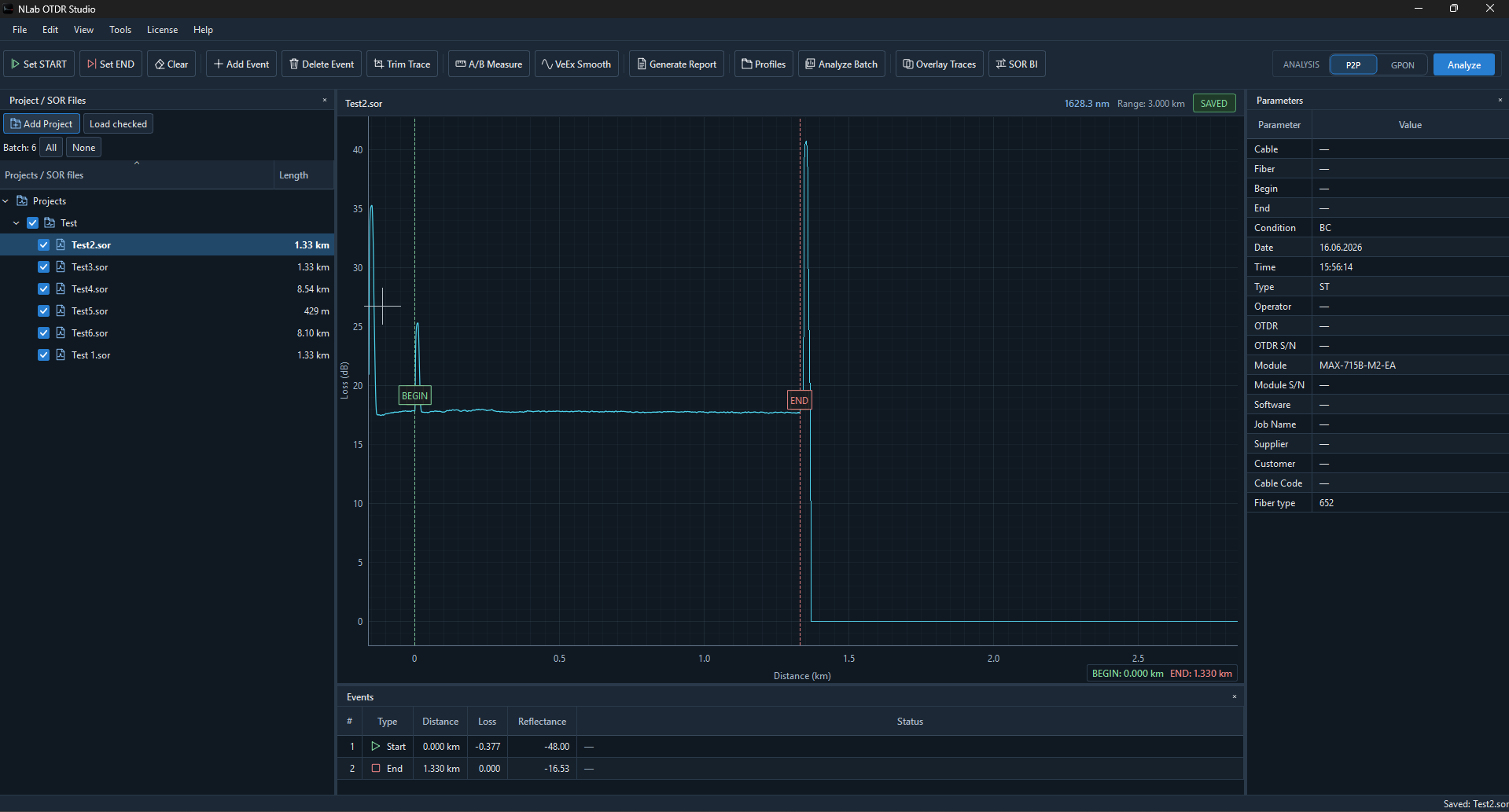
In NLab OTDR Studio, the SOR trace, event table and measurement parameters appear together. The project tree keeps related files and their measurement lengths within reach.
AN SOR FILE IN THE CURRENT WORKSPACE · Trace, events and measurement context. Click to enlarge ↗Explore the project workflow ↗
05 /
Understanding the OTDR Trace
An OTDR trace represents optical power returned from the fiber as a function of distance.
Different changes in the trace can indicate different components or events in the optical link.
Typical OTDR events include:
connectors
mechanical connections
fusion splices
bends
splitters
reflective events
non-reflective events
fiber breaks
end-of-fiber events
The event table helps translate the trace into information that can be used during network installation, troubleshooting and acceptance testing.
An SOR file can contain an event table generated by the OTDR.
Each event can contain information such as:
Event distance
The position of the event measured from the beginning of the fiber.
Loss
The estimated optical loss caused by the event.
Reflectance
The amount of reflected optical power associated with a reflective event.
Event type
Information describing whether the event represents a splice, connector, splitter, reflection, fiber end or another change in the optical link.
The quality of automatic event detection depends on the OTDR, measurement parameters and the tested network, which is why manual verification of a trace is often useful.
A TRACE WITH STRUCTURE
Positions. Losses. Reflections.
The Events table connects numerical values to locations along the trace. What appears in the table depends on the events and measurement information available in the SOR file.
READING EVENT DATA · A detail from the current NLab OTDR Studio Events table. Click to enlarge ↗
07 /
Why Analyze SOR Files on a Computer?
Reviewing OTDR measurements on a larger computer display can make complex traces significantly easier to inspect.
Desktop OTDR software can also provide additional workflow options that may be inconvenient directly on a field instrument.
Typical uses include:
reviewing measurements after field work
comparing multiple fiber traces
verifying splice locations
checking unexpected losses
identifying reflections
reviewing P2P and GPON networks
preparing documentation
checking measurements from different OTDR manufacturers
inspecting archived SOR files
creating customer reports
For technicians working with large numbers of fibers, desktop analysis can significantly improve the measurement review workflow.
08 /
Multiple Wavelength Measurements
Fiber measurements are commonly performed using wavelengths such as 1310 nm and 1550 nm.
Depending on the application, additional wavelengths may also be used.
Comparing traces measured at different wavelengths can help identify problems such as bends or wavelength-sensitive losses.
NLab OTDR Studio allows OTDR traces to be inspected independently and provides tools intended to make comparison and analysis easier.
09 /
P2P and GPON OTDR Measurements
SOR files are used in both traditional point-to-point fiber networks and passive optical networks such as GPON.
A P2P link may contain relatively few events, while a GPON trace can include optical splitters and a much more complex loss profile.
NLab OTDR Studio includes analysis tools designed for both P2P and GPON fiber networks.
Some applications only allow SOR files to be viewed.
NLab OTDR Studio also provides tools for working with trace events and measurement structure.
Depending on the workflow, users can inspect and modify trace-related information, adjust events and work with start and end positions before saving or exporting the result.
Editing should always be performed carefully because an SOR file represents measurement data.
For acceptance documentation and official measurement records, the original SOR files should always be preserved.
11 /
SOR Files vs PDF OTDR Reports
A PDF report and an SOR file serve different purposes.
A PDF report is primarily designed for presentation and documentation.
An SOR file contains the structured OTDR measurement data that can be reopened and analyzed later.
For long-term documentation it is therefore useful to keep both:
the original SOR measurement file
and
the generated OTDR report.
NLab OTDR Studio can be used to analyze the SOR measurement and create a readable report for documentation or customer delivery.
12 /
Open and Analyze SOR Files with NLab OTDR Studio
NLab OTDR Studio is a desktop application developed for technicians and engineers working with fiber optic measurements.
It allows users to open OTDR SOR files, inspect traces, analyze events and work with measurement data from different OTDR platforms.
Whether you are reviewing one fiber or working with a large measurement project, having access to the original SOR trace gives you significantly more information than a static screenshot or PDF.
Download NLab OTDR Studio to open SOR files and analyze their traces directly on your computer.
A FEW MORE ANSWERS
Good questions. Clear answers.
What is an SOR file?+
An SOR file is a structured OTDR measurement file containing the optical trace, events and measurement parameters recorded during a fiber optic test.
What program opens SOR files?+
SOR files require OTDR analysis software. NLab OTDR Studio can open and analyze compatible OTDR SOR files on a computer.
What does SOR stand for?+
SOR is commonly used to describe the standardized Bellcore OTDR measurement file format stored with the .sor extension.
Can I open an SOR file without an OTDR?+
Yes. If you have compatible OTDR analysis software, the file can be opened and analyzed without connecting the original OTDR instrument.
Can SOR files contain splice loss?+
Yes. OTDR SOR files can contain detected event information including event position, loss and reflectance.
Can SOR files from different OTDR manufacturers be opened in the same software?+
In many cases, yes, although manufacturers may implement parts of the Bellcore format differently. NLab OTDR Studio is developed and tested using SOR files from multiple OTDR manufacturers.